Microsoft 365 Tenant-to-Tenant Migration Without Data Loss: The Decisions That Matter Most
Why do so many Microsoft 365 tenant-to-tenant migrations appear successful at cutover, only for missing permissions, broken sharing, and inaccessible data to surface afterward?

Tenant-to-tenant migration is one of those projects that looks straightforward on paper and reveals its complexity about three weeks in. Migrations are often driven by mergers, acquisitions, divestitures, or rebranding initiatives, but the underlying technical complexities remain largely the same.
Permissions do not cross tenant boundaries. Sharing links breaks, and guest access disappears. Teams channels lose their history. Identity conflicts surface at the worst possible moment. None of this is news to experienced migration engineers, and yet data loss from tenant-to-tenant moves remains a frequent post-project conversation.
The success or failure of a tenant-to-tenant migration is rarely determined during cutover. It is usually shaped by the decisions made beforehand, the dependencies teams overlook, and the assumptions that remain untested until users begin working in the new environment.
Why tenant-to-tenant migration loses data differently
Standard Microsoft 365 migrations, such as moving from on-premises Exchange to M365, involve a relatively contained set of variables. This contrasts sharply with Microsoft 365 tenant-to-tenant migration overview, where both environments operate as external systems despite belonging to the same ecosystem.
Tenant-to-tenant migration is a different ballgame altogether.
The source and destination are both M365 environments, which somehow creates a false sense of compatibility. In practice, the two tenants treat each other as external organizations. What that means in operational terms:
- Azure AD groups do not carry across. They have to be rebuilt.
- SharePoint permissions are assigned to source tenant identities that do not exist in the destination. Every permission set needs remapping.
- Sharing links pointing to source tenant resources breaks immediately after cutover.
- Guest users with access in the source tenant lose that access in the destination with no automatic remediation.
- Teams channel history is frequently assumed to be preserved, only for organisations to discover after cutover that important conversations, context, or records are incomplete.
Most migration plans underestimate the operational impact these dependencies create.
Many post-migration issues can be traced back to assumptions made early in the project, long before users experience the consequences after cutover.
The decisions made before migration that determine the outcome
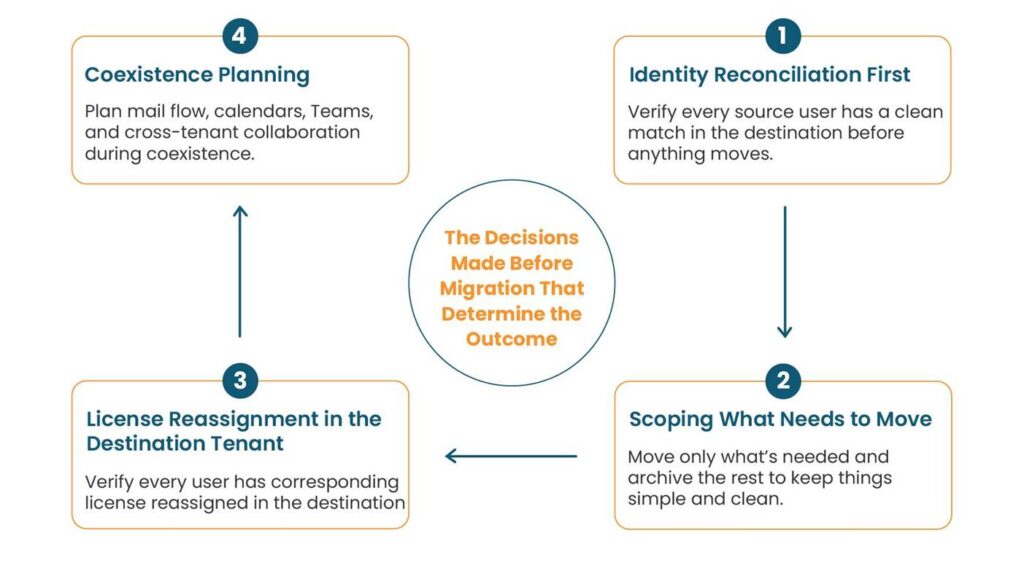
Identity reconciliation first
Identity conflict is the most daunting pre-migration problem and the one teams most frequently underestimate. Multiple domains, hybrid identities, guest users with legacy UPNs, and accounts that exist in both tenants under different names create mapping problems that are often underestimated until access issues begin appearing after migration.
User identity alignment is one of the most consequential decisions in any tenant-to-tenant migration because every downstream permission, ownership assignment, and access relationship depends on it.
Accounts without a clean match need to be resolved manually. Running this reconciliation work after migration begins is where silent data loss originates, and files land in the destination tenant with no owner, permissions break, and items that look migrated are inaccessible.
Scoping what needs to move
What about old employee accounts, inactive Teams workspaces, unused shared mailboxes, and abandoned project sites? In many cases, they end up increasing operational complexity, extending migration timelines, and leaving behind additional post-migration remediation tasks.
One of the most common migration assumptions is that everything should move. In practice, unnecessary data often increases complexity, extends validation efforts, and introduces dependencies that nobody realised still existed.
Scope disagreements rarely emerge during planning sessions. They typically surface after migration, when stakeholders discover that their expectations of what was moving did not match reality.
Licensing decisions often create unexpected post-migration gaps
One of the most overlooked assumptions in tenant-to-tenant migration projects is that equivalent licensing automatically results in an equivalent user experience. Licensing differences between source and destination environments can affect access to features, retention policies, collaboration capabilities, and compliance controls in ways that are not immediately obvious.
These issues rarely appear during planning discussions because the focus tends to remain on moving users and data. They become visible only after migration, when users discover that workflows they previously relied on no longer function as expected.
The challenge is not simply whether users have licenses assigned, but whether the destination environment supports the same operational requirements as the source.
The false sense of security created by coexistence
Many organisations view coexistence periods as a way to reduce migration risk. In practice, running two active environments simultaneously often introduces a different set of challenges. Users become uncertain about where information resides, ownership boundaries become less clear, and communication patterns become fragmented.
The longer coexistence remains in place, the greater the likelihood that temporary processes become permanent workarounds. What begins as a risk-mitigation strategy can quickly become a source of operational complexity if expectations, responsibilities, and timelines are not clearly defined.
The workloads that carry the highest risk of silent data loss
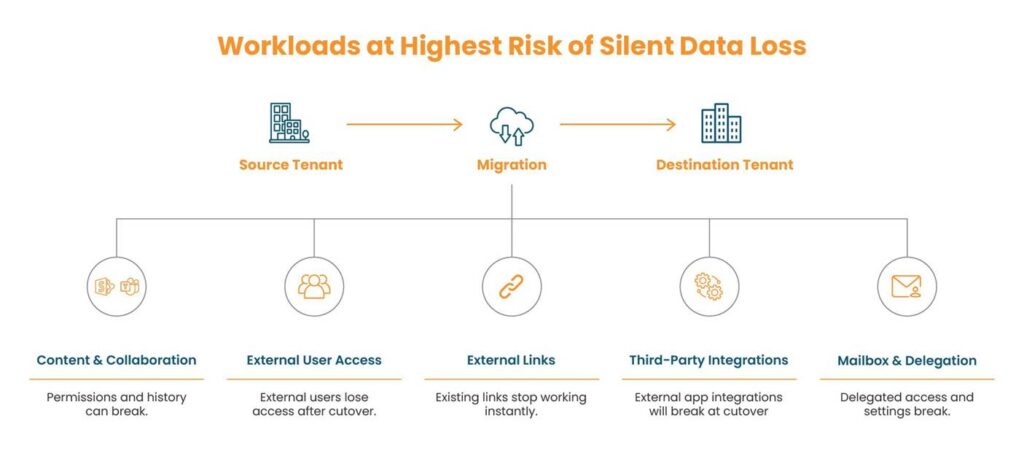
SharePoint and Teams
SharePoint permission complexity compounds at every level. A site collection carries permissions. So does each document library within it, each folder, and in some cases, individual files. Every one of those needs remapping to destination tenant identities and validating, not just spot-checking at the top level.
Teams channels are equally daunting. Message history does not migrate by default. Teams channel history is often assumed to be preserved, only for organisations to discover after cutover that critical conversations, context, or records are incomplete.
Guest users and external sharing
Every guest user with access to SharePoint sites, Teams channels, or shared drives in the source tenant starts from scratch in the destination. Access does not carry over. External collaboration is often treated as a secondary concern until business users begin reporting missing access and broken working relationships after cutover.
These are the pain points that surface quietly and linger long after cutover.
External sharing links pointing to source tenant resources break at cutover. Any links shared externally, whether in emails, on websites, or in documents, become dead references the moment the domain moves. The challenge is rarely the technical migration itself. It is the number of external relationships that depend on access models organisations no longer actively track.
Third-party app integrations and OAuth tokens
Every business application connected to the current tenant through OAuth authorization or single sign-on will not be carried forward. This is just how tenant-bound authorization works. If third-party integrations are not mapped properly, it can affect the user-experience post migration on a wider level.
Obvious business integrations like CRM, HRMS, and ITSM stack are easy to identify. The harder ones are the niche, departmentally owned apps that are used by individuals or teams and are connected to the source tenant over the years with no central record present.
Marketing automation platform, sales enablement tools, video conferencing add-ins, project management tool, e-signature services, browser extensions with M365 sign-in, and custom internal apps using Microsoft identity all fall into this category.
Once the user identity moves, every OAuth token issued against that tenant becomes invalid.
OAuth and SSO dependencies often remain invisible until business-critical applications stop working after migration.
Mailboxes with delegated access and shared calendars
Mailbox delegation settings, including permissions to access another user’s inbox or send emails on their behalf, are not preserved during cross-tenant migrations.
Shared calendar visibility breaks.
Distribution groups, mailbox delegation, and shared calendars are often so deeply embedded in day-to-day operations that organisations forget they exist until users suddenly lose access to critical workflows.
Execution, validation, user adoption, and what gets skipped
Why successful pilots can be misleading
Pilot migrations often create a sense of confidence that is not always representative of the wider environment. Users selected for pilots rarely reflect every dependency, permission structure, workflow, or exception that exists across the organisation. Many of the most disruptive migration issues only emerge when the project reaches more complex user groups and business functions.
Validate before decommissioning
Post-migration validation is the step that gets compressed under schedule pressure, and it is the step that determines whether data loss gets caught before or after the source tenant is gone.
One of the most damaging migration assumptions is that successful cutover automatically means successful migration. Many issues only become visible when users begin working with their data in the new environment.
Organisations that remove access to the source environment too quickly often discover problems only after their easiest recovery options have disappeared.
Technical success does not guarantee user success
A migration can be technically successful and still create significant disruption for users. Data may be intact, permissions may be mapped correctly, and systems may function as expected, yet users can still encounter confusion, broken workflows, or unexpected changes to how they work. Organisations often underestimate how differently technical teams and end users define migration success.
What gets skipped
Inactive accounts with licenses attached. Shared mailboxes nobody uses, but someone owns. SharePoint sites that were never properly governed carry myriad permission assignments that make no sense today. These are not edge cases. They are the inevitable residue of years of organic growth, and tenant-to-tenant migration is the moment they all surface at once.
Data loss is rarely the result of a single technical failure. More often than not, it stems from overlooked dependencies, inaccurate assumptions, and decisions made long before cutover begins.

Jinal Khimani leads marketing at Infrassist Technologies with a love for structure, strategy, and sweating the details. A software engineer turned marketer, she’s all about clear messaging and adding just the right personality to brands. Whether it...




