Microsoft Brings Hardware-Accelerated BitLocker to Windows 11, Windows Server 2025
BitLocker encryption moves to hardware, delivering faster performance with lower CPU usage.

Key Takeaways:
- BitLocker encryption is now offloaded to hardware, reducing CPU strain and improving overall system responsiveness.
- Encrypted drives see major performance gains.
- Initial support targets select next-generation Intel systems.
Microsoft has introduced hardware-accelerated BitLocker for Windows 11 and Windows Server 2025. This new feature offloads encryption to dedicated hardware, which reduces CPU usage and boosts battery life on supported Windows 11 devices.
BitLocker in Windows 11 is a built-in security feature that encrypts the entire drive to protect data from unauthorized access, even if the device is lost or stolen. It uses advanced encryption algorithms and integrates with the Trusted Platform Module (TPM) to securely store keys, which ensures that only authorized users can unlock the system. This helps protect sensitive files against physical attacks and adds an extra layer of security for both personal and enterprise environments.
“As NVMe drives continue to evolve, their ability to deliver extremely fast data transfer rates has set new expectations for system responsiveness and application performance. While this is a major benefit for users, it also means that any additional processing — such as real-time encryption and decryption by BitLocker — can become a bottleneck if not properly optimized,” Microsoft explained.
How does hardware-accelerated BitLocker improve performance and battery life?
To address this problem, Microsoft has added support for hardware-accelerated BitLocker in Windows 11 version 25H2/24H2 and Windows Server 2025. This feature leverages the upcoming system on chip (SoC) and CPU capabilities, along with existing support for UFS (Universal Flash Storage) Inline Crypto Engine technology.
In Windows 11, hardware-accelerated BitLocker works by shifting the heavy cryptographic operations from the CPU to a dedicated hardware crypto engine built into modern processors or system-on-chip designs. This offloading reduces CPU load, improves overall system responsiveness, and extends battery life, along with maintaining full-drive encryption security. Moreover, encryption keys are wrapped and protected at the hardware level to add another layer of defense beyond TPM, which makes the process both faster and more secure.
Benchmark results
Microsoft’s benchmarks show that hardware-accelerated BitLocker delivers a huge performance boost compared to the software-based version. It significantly improves storage operations like sequential and random read/write speeds, and cuts CPU usage by about 70%, which makes encrypted drives perform almost like unencrypted ones. This efficiency also translates into better battery life to offer both speed and security without compromise.
CrystalDiskMark tests found that hardware-accelerated BitLocker more than doubles sequential read and write speeds compared to the software-based version, which eliminates CPU bottlenecks. For instance, read speeds jumped from about 1,632 MB/s to 3,746 MB/s, and write speeds improved from roughly 1,513 MB/s to 3,530 MB/s, with similar gains across random operations.
Deployment, activation, and policy considerations
Microsoft noted that initial support for hardware-accelerated BitLocker will roll out on Intel vPro systems featuring Intel® Core™ Ultra Series 3 (“Panther Lake”), with other manufacturers expected to adopt the technology later. Users can check if the feature is active on their device by running manage-bde -status in a command prompt with admin privileges. If it’s enabled, they will see “Hardware accelerated” listed under the Encryption Method.
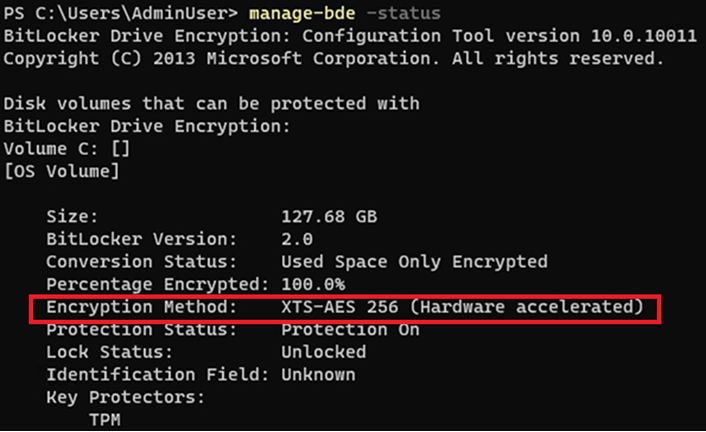
Hardware-accelerated BitLocker activates automatically during setups like WinPE or offline provisioning on supported hardware. However, it won’t enable if manual configurations or policies specify unsupported encryption algorithms or key sizes. To address this issue, Microsoft plans future updates that will adjust key sizes automatically to ensure hardware acceleration is applied wherever possible.

Rabia has a master's degree in Software Engineering and she has years of experience writing professionally about Microsoft products and other technologies. Rabia has also written for OnMSFT.com as well as Windows Report. She is always up to date on t...


