Microsoft Previews Cloud Rebuild for Windows 11 Recovery from Boot Failures
New recovery capabilities aim to simplify device restoration and preserve user settings after system failures.

Key Takeaways:
- Cloud rebuild can reinstall Windows and device drivers directly from Windows Update.
- This feature works through Windows Recovery Environment even when Windows fails to boot.
- Windows 11 version 26H2 will enable backup and restore by default on Microsoft Entra-managed devices.
Recovering a broken Windows 11 PC could soon become much easier. Microsoft is testing a new Cloud rebuild feature with Windows Insiders that reinstalls the operating system directly from the cloud.
🎬 Watch This Week in IT.
According to Microsoft, the Cloud rebuild feature lets users restore a PC to a clean and reliable state even when the operating system fails to boot. It reinstalls Windows by downloading the required operating system files and device drivers directly from Windows Update.
“Unlike Reset your PC, Cloud rebuild downloads both the target Windows image and the device’s drivers from Windows Update, so the device comes back fully functional, without USB media, without a custom image, and without depending on the integrity of the installed operating system,” Microsoft explained.
Windows 11 users can start the Windows Recovery Environment (WinRE) by clicking Troubleshoot > Recovery and uninstall > Cloud rebuild. Now, connect over a Wi-Fi network or wired Ethernet from within WinRE. Finally, review the specific Windows build, edition, and language, and confirm the data-loss warning before rebuild begins.
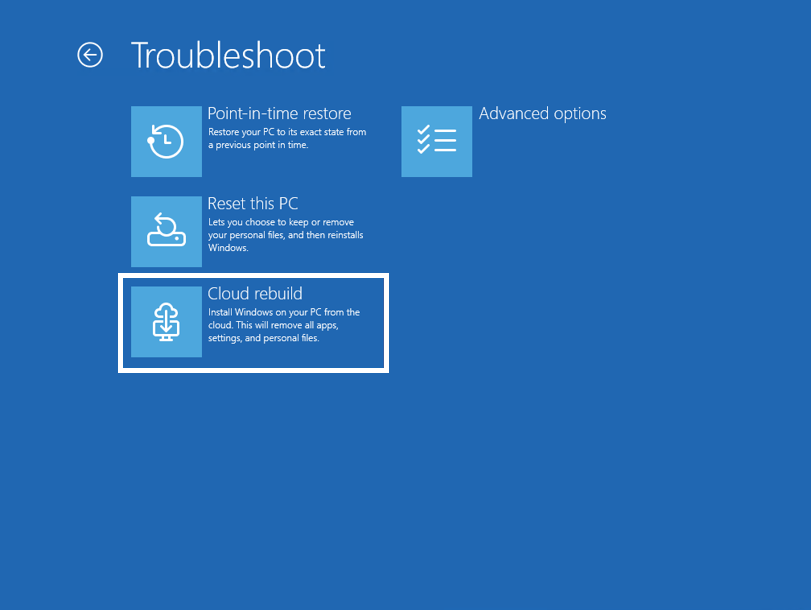
How to use Cloud rebuild in the Windows Recovery Environment?
The Reset this PC feature also offers a cloud download option, but it still relies on the device’s existing recovery environment and is designed for systems that can still boot into Windows. In contrast, the new Cloud rebuild feature downloads a complete Windows image and the required device drivers directly from Windows Update. It allows users to recover even when the operating system fails to start.
Microsoft has announced that Windows settings backup and restore will be enabled by default for Microsoft Entra-joined or Microsoft Entra hybrid-joined enterprise devices running Windows 11 version 26H2. Up until now, administrators had to enable this feature (previously called Windows Backup for Organizations) manually. This new default backup option will automatically save users’ settings and list of Microsoft Store apps, which makes it easier to restore a familiar working environment after a device reset or reinstallation.
Microsoft notes that administrators will continue to have full control over mobile device management (MDM) solutions. Any administrator-defined settings will take precedence, and restoring backed-up settings will remain an optional, admin-managed action.

Rabia has a master's degree in Software Engineering and she has years of experience writing professionally about Microsoft products and other technologies. Rabia has also written for OnMSFT.com as well as Windows Report. She is always up to date on t...