Microsoft Introduces WebView2 Support to Streamline Authentication on Windows 11
Windows 11 sign-ins get faster, safer, and ready for passwordless authentication with WebView2.

Key Takeaways:
- Microsoft adds WebView2 support to Entra ID for faster, secure Windows 11 sign-ins.
- Modern web standards enable smoother authentication and future-ready features.
- IT admins should start adopting WebView2 ahead of upcoming default rollout.
Microsoft is taking a big step toward modernizing authentication on Windows 11 by introducing WebView2 support for Entra ID sign-ins. This update ensures a faster, more secure, and consistent experience, which paves the way for future innovations like passwordless login and advanced identity features.
WebView2 is a Microsoft component that allows applications to embed modern web content (such as HTML, CSS, and JavaScript) directly within their native interface using the Chromium engine. This approach provides a consistent, secure, and up-to-date browsing experience inside apps without launching a separate browser. It enables developers to deliver richer UI, modern authentication flows, and improved compatibility with web technologies.
“Authentication is the front door to your digital world. As identity experiences evolve, we need a foundation that supports modern web standards, advanced security, and future-ready scenarios. WebView2 provides exactly that,” Microsoft explained. “Moving to WebView2 is more than a technical upgrade — it’s a strategic investment in secure, user-friendly identity experiences. We’re committed to evolving Entra ID to meet the needs of modern organizations and developers.”
Microsoft highlighted various benefits of WebView2 for Windows 11 customers. It brings modern standards to Windows authentication by supporting the latest web technologies like React and Fluent UI, which deliver a more responsive sign-in experience. Moreover, WebView2 enables future-ready features (such as passwordless login, passkeys, and Conditional Access policies) to reduce unnecessary redirects for smoother workflows. Its broader compatibility also ensures seamless integration with third-party identity providers and enterprise applications built on modern web frameworks.
How to enable/disable WebView2 integration in the Entra ID plugin?
To enable or disable WebView2 in the Entra ID plugin, administrators will need to follow the steps mentioned below:
- Install KB5072033 or a newer update on Windows 11 version 25H2 and 24H2.
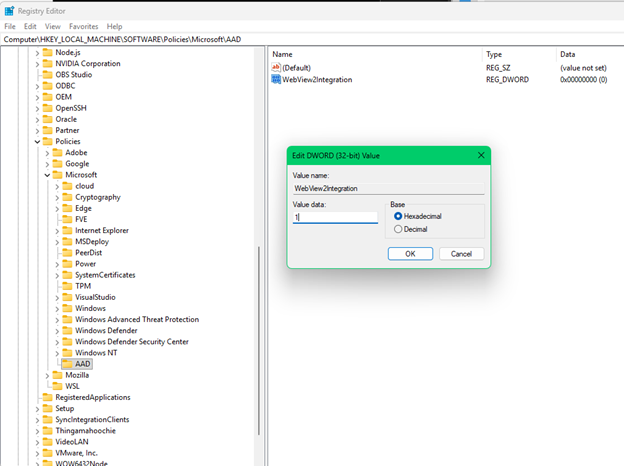
- Enable WebView2 support via registry:
- Path: Computer\HKEY_LOCAL_MACHINE\SOFTWARE\Policies\Microsoft\Windows\AAD
- Add DWORD WebView2Integration = 1 to turn ON
- Set = 0 to turn OFF
- After modifying, restart or terminate the Microsoft.AAD.BrokerPlugin (Web Account Manager) process to apply changes.
Preparing for WebView2 as the default Windows authentication
Microsoft noted that WebView2 is about to become the default mechanism for Windows Account Manager authentication in future Windows releases. To prepare for this transition, Microsoft recommends that IT administrators start adopting and testing WebView2 now by updating policies, proxy configurations, and applications.
Overall, WebView2 uses a Chromium-based engine for handling authentication within Windows apps. This change is designed to improve compatibility and prepare for features like passkeys, Conditional Access, and AI-based identity management, which make sign-in processes more consistent and secure across different environments.

Rabia has a master's degree in Software Engineering and she has years of experience writing professionally about Microsoft products and other technologies. Rabia has also written for OnMSFT.com as well as Windows Report. She is always up to date on t...


