Hackers Spoof Office 365 Domains to Launch Stealthy Internal Phishing Attacks
How attackers exploit Office 365 domain trust to bypass defenses and deceive employees.

Key Takeaways:
- Attackers are making phishing emails appear as legitimate internal Office 365 messages.
- Weak SPF, DKIM, and DMARC configurations increase exposure to these attacks.
- Microsoft advises stricter email authentication and layered security controls to reduce risk.
Cybercriminals are using increasingly sophisticated phishing tactics to make malicious emails appear as if they were sent from within an organization. In a recent report, Microsoft detailed how attackers are spoofing Office 365 domains to execute these highly deceptive campaigns.
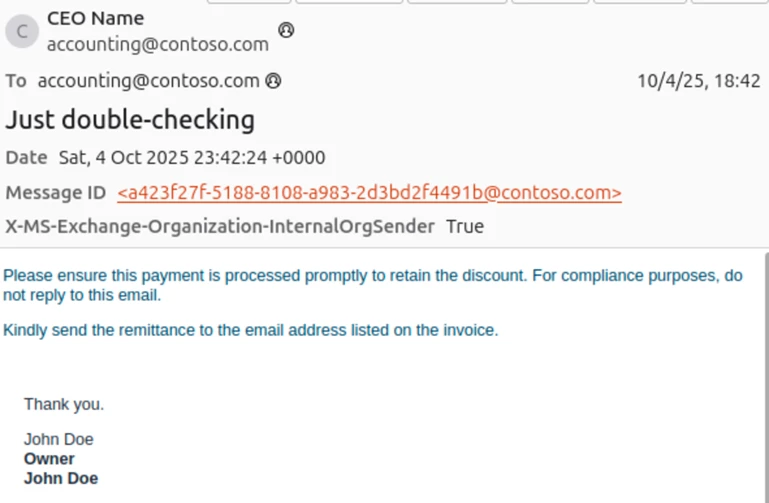
According to the Microsoft Threat Intelligence team, hackers are exploiting complex email routing configurations (particularly in cases where MX records don’t point directly to Office 365) and weak domain spoofing protections to make phishing emails appear as if they were sent internally. These deceptive messages often use identical “From” and “To” addresses and include markers that mimic internal communications. However, a closer look at email headers shows signs of external origin (such as SPF and DMARC failures), anonymous authentication, and routing indicators that flag external delivery.
“Setting strict Domain-based Message Authentication, Reporting, and Conformance (DMARC) reject and SPF hard fail (rather than soft fail) policies and properly configuring any third-party connectors will prevent phishing attacks spoofing organizations’ domains,” the Microsoft Threat Intelligence team explained.
Phishing-as-a-Service (PhaaS)
Microsoft mentioned that phishing actors are increasingly relying on platforms like Tycoon2FA, which provide ready-made infrastructure and templates for launching attacks. These campaigns often mimic business communications, such as voicemails, shared documents, HR notifications, password reset alerts, and even fake invoices or financial attachments. In October 2025, Microsoft reported blocking over 13 million Tycoon2FA-related emails, many of which impersonated legitimate corporate domains to deceive recipients.
In addition to credential phishing attacks, these spoofed emails were used to influence financial decisions and transactions. The hackers posed as executives or finance teams to request payments via fraudulent invoices or fake bank documents.
Who is most at risk and why do these attacks succeed?
Organizations with complex email routing (such as those using on-premises Exchange or third-party services before messages reach Office 365) are especially vulnerable if they lack strict SPF, DKIM, and DMARC enforcement. On the other hand, tenants whose MX records point directly to Office 365 benefit from built-in spoofing protections, which make them resistant to this attack method. These phishing campaigns have been active since May 2025 and have targeted multiple industries and often incorporated financial scam attempts alongside credential theft.
Recommended mitigation and hardening strategies
To defend against these phishing attacks, organizations should start by enforcing strong email authentication protocols. This includes implementing SPF with hard-fail settings, DKIM, and DMARC policies configured to reject unauthorized messages. Moreover, it’s important to use proper mail flow rules and connectors to ensure spoofed emails are accurately detected.
In addition to authentication, administrators should implement advanced security layers, including Safe Links and Zero-hour Auto Purge in Microsoft Defender for Office 365, SmartScreen in Microsoft Edge, and cloud-based malware detection. They should also adopt passwordless, phishing-resistant multi-factor authentication and apply Conditional Access for privileged accounts to reduce risk further.
In case of an incident, administrators must reset compromised accounts, revoke sessions and MFA devices, remove malicious inbox rules, and restore any altered financial or payroll settings. For comprehensive defense, Microsoft Defender XDR and Copilot provide integrated detection and response across email, identity, and endpoints, which help organizations quickly contain and remediate threats.

Rabia has a master's degree in Software Engineering and she has years of experience writing professionally about Microsoft products and other technologies. Rabia has also written for OnMSFT.com as well as Windows Report. She is always up to date on t...




