Microsoft Intune Adds Real‑Time App Inventory, Linux SSO Enhancements
Smarter app insights, stronger Linux authentication, and expanded Apple device control in the latest Microsoft Intune update.

Key Takeaways:
- Microsoft Intune boosts Windows app visibility with faster, richer inventory insights.
- Linux devices get a more secure, seamless SSO experience with a modern authentication model.
- Apple device management expands with broader enrollment and tighter admin controls.
Microsoft is rolling out a series of enhancements to Microsoft Intune, targeting deeper visibility and tighter control across modern endpoints. This month’s updates span improved Windows app inventory, a more secure Linux SSO experience, and expanded enrollment and management capabilities for Apple devices.
Microsoft has added new enhanced app inventory capabilities in the “All Apps” tab in Microsoft Intune. This new feature provides more frequent and detailed application inventory for Windows devices. Instead of infrequent updates, device app data is refreshed multiple times daily for Windows machines. This inventory includes richer details such as installation paths and dates, app size, architecture, uninstall commands, and language support and store identifiers. Administrators can also get details about all apps used by users on a Windows device.
This release allows IT admins to get more reliable and near-real-time visibility into installed applications. To use the app inventory feature, administrators need to configure a new device configuration policy based on the Properties Catalog and then assign it to corporate-owned Windows 11 devices enrolled in Microsoft Entra ID.
Modernized SSO for Linux endpoints
The latest Microsoft Intune update introduces a redesigned single sign-on (SSO) experience for Linux devices through the new Microsoft Identity Broker. This replaces the older Java-based system with a more secure solution, which enables tighter integration with Microsoft Entra ID. Linux endpoints now benefit from device-based authentication, a smoother login process, and improved protection against phishing attacks. These enhancements bring the Linux sign-in experience more in line with what users typically expect on Windows and macOS systems.
“The Microsoft Identity Broker supports a more integrated trust model between the endpoint and Microsoft Entra ID by using full device join to issue device-bound authentication tokens, going beyond what basic enrollment supports,” Microsoft explained.
This approach allows administrators to implement stronger authentication methods, including phishing‑resistant multi-factor authentication options such as certificates, smart cards, and security keys. Moreover, this new feature provides a consistent single sign-on experience across platforms, which allows both Microsoft and non-Microsoft applications on devices like iOS, Windows, and macOS.
Expanded Apple device enrollment and management
Microsoft has rolled out automated device enrollment (ADE) support for visionOS and tvOS devices. This capability will enable administrators to manage large-scale Apple device deployments in unattended and shared-use scenarios. Once enrolled, IT admins will be able to remotely delete, retire, restart, rename, or sync visionOS and tvOS devices, individually or in bulk. Administrators will be able to group devices at enrollment time with enrollment time grouping within the ADE enrollment policy.
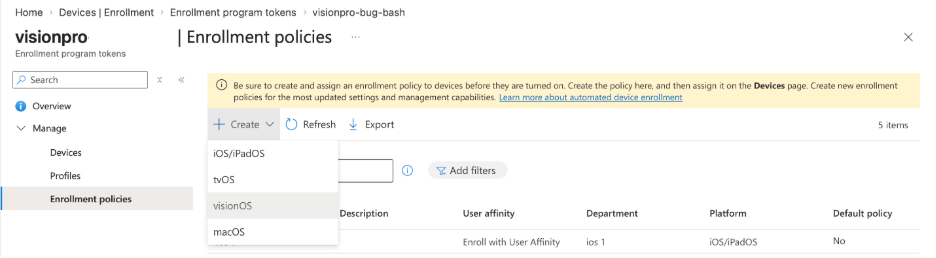
Last but not least, Microsoft Intune now gives organizations more control over how Managed Apple Accounts are used by allowing them to choose whether these accounts can access any Apple device or only organization-owned devices. This helps ensure that corporate identities remain restricted to organizational hardware, and also allows administrators to prevent personal Apple accounts from signing in on organization-owned devices.

Rabia has a master's degree in Software Engineering and she has years of experience writing professionally about Microsoft products and other technologies. Rabia has also written for OnMSFT.com as well as Windows Report. She is always up to date on t...



