Microsoft Intune’s Update Boosts Enrollment Insights and Privilege Management
Microsoft Intune update empowers IT admins with improved visibility, smarter privilege controls, and stronger network security.

Key Takeaways:
- Microsoft Intune now shows devices failing to join static groups during enrollment for faster troubleshooting.
- New “elevate as current user” option preserves user context while keeping actions auditable.
- Unified dashboards track privilege elevation trends, and network updates improve security and performance.
Microsoft Intune’s October 2025 update brings several enhancements to security and device management. This release allows administrators to gain visibility into devices failing to join static groups during provisioning across Windows Autopilot and Android Enterprise devices.
“Administrators can now navigate enrollment time grouping failures in the admin center to gain more visibility of devices that didn’t become members of their specified static device groups during enrollment. The enrollment time grouping failures report is available in the admin center under Devices > Monitor > Enrollment time grouping failures. Now updated information is displayed within 20 minutes, helping device configuration removal when a device is not part of the required group,” Microsoft explained.
Identity‑aware privilege escalation in EPM
Microsoft has added a new “elevate as current user” option that allows elevated processes to run under the user’s own account rather than a virtual system account. This preserves user environment context (like profile, registry, server license) while keeping actions fully auditable, especially useful when apps depend on user-specific settings.
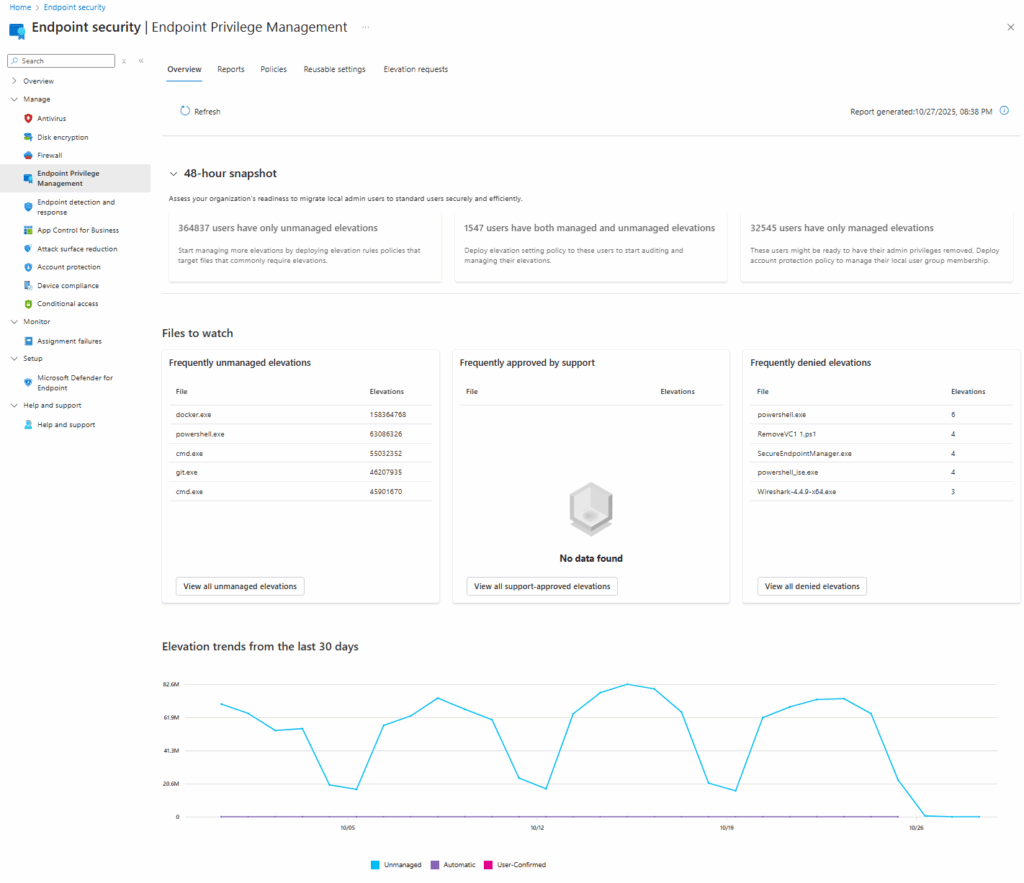
EPM Overview dashboard
Administrators now get a unified dashboard for monitoring privilege elevation trends. It shows readiness for transitioning to standard user environments, friction points, and helps refine policies. This feature helps to reduce help‑desk tickets and increases security by limiting persistent admin rights.
Infrastructure & Intune service updates
To improve security, reliability, and performance, Microsoft Intune network services are migrating to new IPs via Azure Front Door. This change affects organizations using a firewall allowlist that allows outbound traffic based on IP addresses/Azure service tags. Microsoft advises that customers using IP allow‑listing or firewalls must update their configurations accordingly.
Last but not least, Microsoft has announced that the ability to apply Windows security updates during the Enrollment Status Page in Out-of-Box Experience is delayed until January 2026. Administrators will still be able to control update timing through ESP for both Intune-managed and Autopilot devices.

Rabia has a master's degree in Software Engineering and she has years of experience writing professionally about Microsoft products and other technologies. Rabia has also written for OnMSFT.com as well as Windows Report. She is always up to date on t...



