Microsoft Intune Remote Help Can Now Access Unattended Windows PCs Without User Approval
Organizations can support locked, shared, and after-hours devices while maintaining role-based security controls.

Key Takeaways:
- Microsoft Intune Remote Help can now access unattended Windows devices without user participation.
- Microsoft requires a dedicated custom permission for unattended remote sign-in.
- Organizations should carefully scope access and review logs to maintain accountability.
Microsoft is making it easier for IT teams to troubleshoot unattended Windows devices with a new Intune Remote Help feature. Administrators can now remotely access devices even when users are unavailable to approve a support session, which reduces delays for locked, shared, or after-hours devices.
Previously, Remote Help on Windows required an end user to be present to approve and join a support session before an IT technician could begin troubleshooting. This created delays when devices were unattended, locked at the sign-in screen, used as shared workstations, or needed maintenance outside business hours.
How Microsoft Intune Remote Help handles unattended sessions
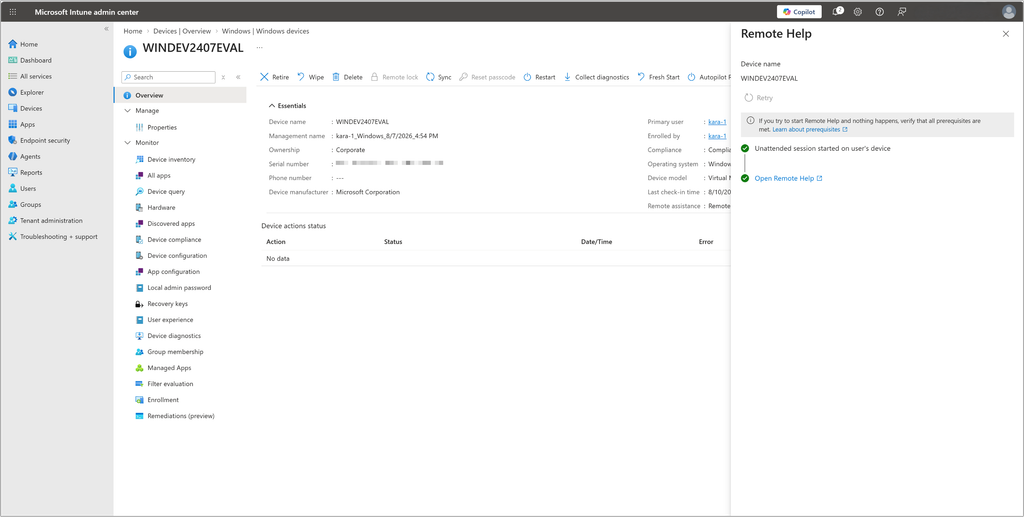
This new unattended support feature removes that dependency by allowing authorized help desk personnel to securely access and repair devices even in the users’ absence. It also provides session isolation, a security-first design, user awareness, and rich session capabilities. This feature includes controls designed to maintain visibility and accountability around unattended sessions.
“This feature uses a dedicated permission: Remote Help app > Windows unattended control remote sign-in. It must be explicitly assigned to helpdesk roles targeting specific device groups. To maintain a higher security boundary, this permission isn’t included in any Intune built-in role, including existing roles such as Help Desk Operator or School Administrator, and must be granted through a custom role assignment,” Microsoft explained.
What does the change mean for IT admins?
This update makes Microsoft Intune Remote Help more useful for organizations that regularly manage unattended Windows PCs. Help desk teams can handle certain support and maintenance tasks without coordinating with users or waiting for approval to connect.
However, unattended access expands what support personnel can do without direct user involvement. Microsoft’s decision to keep the capability outside its built-in Intune roles reflects that added level of access.
Organizations considering the feature should define appropriate custom roles, limit access to relevant device groups, and review Remote Help logs to ensure unattended sessions remain accountable.

Rabia has a master's degree in Software Engineering and she has years of experience writing professionally about Microsoft products and other technologies. Rabia has also written for OnMSFT.com as well as Windows Report. She is always up to date on t...