Microsoft Intune Expands Policy Approvals and Analytics for Stronger Device Governance
New governance controls, enhanced device analytics, and refined Apple policy targeting strengthen enterprise endpoint management.

Key Takeaways:
- Multi-admin approvals expand to critical configuration and compliance policies.
- Advanced Analytics boosts large-scale device query precision and troubleshooting speed.
- Apple DDM gains assignment filters for more granular device targeting.
Microsoft Intune’s February release addresses persistent administrative pain points by eliminating risky workarounds and introducing stronger, policy-driven controls. The update adds multi-admin approvals, enhanced multi-device query capabilities, and assignment filter support for Declarative Device Management.
Microsoft Intune has introduced multi‑administrator approval capabilities for device configuration policies created through the Settings Catalog and device compliance policies. This means that any critical policy changes (such as creating, modifying, and deleting) must be approved by a second admin before taking effect. This expansion builds on the previously supported approvals for apps, scripts, device actions (wipe, retire, delete), RBAC roles, and device categories. These approvals reduce the risk of accidental or unauthorized changes and improve governance, with all actions fully logged in Intune audit logs.
“The addition of compliance and configuration policies approvals help enable organizations to offer a more comprehensive safety net for their most critical policies. In environments where configuration drift can lead to non-compliance and security risks, this level of oversight is not simply a good practice, but rather a preventive control and governance option integrated into the IT workflow,” the Microsoft Intune team explained.
Improved advanced analytics for faster troubleshooting
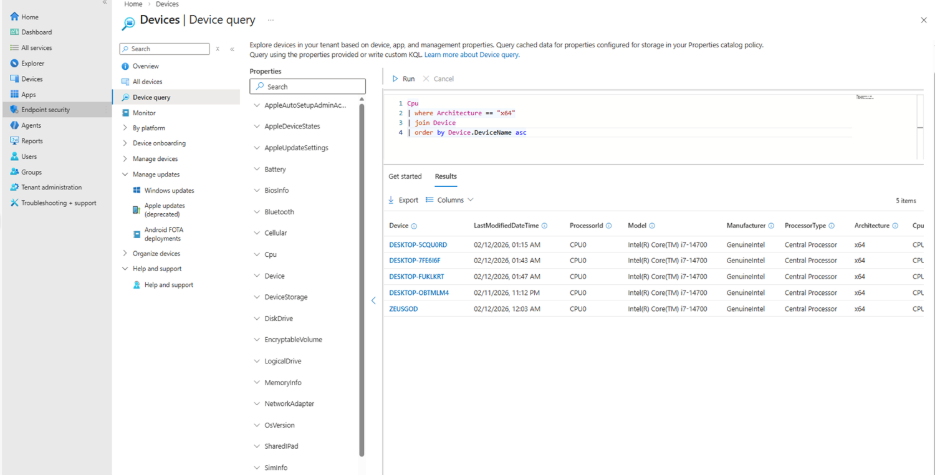
Microsoft Intune’s Advanced Analytics now provides more detailed operator data in multiple device query (MDQ) results. Microsoft has also added support for new join types such as leftanti and rightsemi to help IT admins identify missing devices or configurations more accurately. These new types also enable administrators to run large‑scale fleet queries across diverse OS types with greater precision. This enhancement strengthens Zero Trust decision‑making by giving admins more reliable and actionable device‑level insights.
Administrators can now click Advanced Analytics device join syntax in MDQ results to quickly navigate to device details and improved error messaging. They can also join the results on the Device field without leveraging custom Device syntax.
More precise targeting for Apple devices
Previously, Declarative Device Management (DDM) policies didn’t support assignment filters. This limitation prevented administrators from targeting devices by OS version or differentiating between company-owned and personally owned devices.
With this update, Apple device management now allows more precise targeting by supporting assignment filters for Declarative Device Management (DDM). As Apple expands DDM support across its platforms, Microsoft Intune continues to provide a unified way for admins to apply policies efficiently across diverse Apple ecosystems.

Rabia has a master's degree in Software Engineering and she has years of experience writing professionally about Microsoft products and other technologies. Rabia has also written for OnMSFT.com as well as Windows Report. She is always up to date on t...



