Microsoft Intune Adds Phased Deployments and Android Management Enhancements
Microsoft is introducing phased rollout controls, streamlined troubleshooting tools, and new Android management capabilities to help IT teams manage deployments.

Key Takeaways:
- Microsoft Intune Deployments introduces phased rollouts for Windows apps and policies in public preview.
- A redesigned device overview page centralizes troubleshooting and management tasks in a single interface.
- New Android features include bulk eSIM management and frontline worker enhancements for shared-device environments.
IT administrators are under pressure to deploy apps, policies, and device updates without disrupting users. Large-scale rollouts can create several issues if problems aren’t detected early, while troubleshooting often requires jumping between multiple admin consoles and device views. Moreover, managing Android devices throughout their lifecycle remains labor-intensive, particularly in frontline and shared-device environments.
Without better rollout controls, a faulty app or policy can affect entire organizations before administrators have time to respond. Fragmented management experiences slow down troubleshooting, which increases help desk workloads and delays remediation. Meanwhile, manual provisioning and retirement processes for Android devices consume valuable IT resources and increase the risk of configuration errors.
Microsoft Intune simplifies device troubleshooting
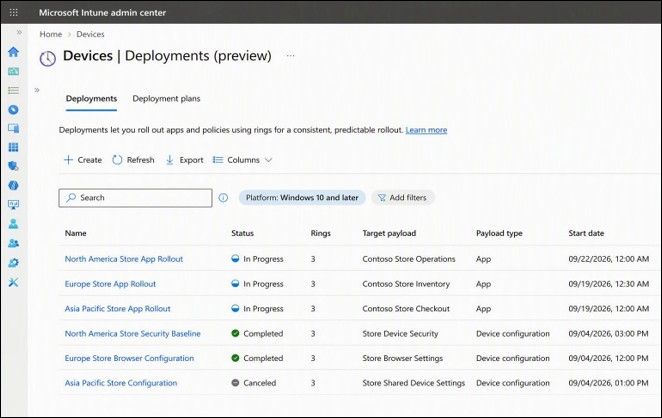
Microsoft’s Intune updates focus on reducing deployment risk and simplifying device management. The main new feature is Microsoft Intune Deployments, now in public preview, which introduces phased rollouts for Windows apps and configuration policies. Administrators can create deployment rings, stagger releases, monitor progress, and pause or cancel rollouts if issues arise. Microsoft mentioned that reusable deployment plans also help standardize future releases.
Microsoft has also redesigned the device overview page in the Intune admin center, which brings device details, activity history, reports, troubleshooting tools, and administrative actions into a single interface. This streamlines investigations and helps support teams resolve issues more efficiently.
New Android management features reduce manual work
On the Android front, Microsoft Intune now supports bulk eSIM management for up to 100 corporate-owned Android Enterprise devices at a time, which reduces manual provisioning work. The new Managed Home Screen improvements also allow frontline workers to answer urgent Microsoft Teams calls before completing authentication while maintaining security controls for protected apps.
This update also expands advanced Intune capabilities (such as Enterprise Application Management, Microsoft Cloud PKI, and Remote Help) to more government cloud environments, which extends enterprise-grade management features to public-sector organizations.
It’s important to note that phased deployments and centralized management improve control, but they introduce additional planning requirements. IT teams must define deployment rings, monitor rollout signals, and maintain governance structures to benefit from the new features in Microsoft Intune.

Rabia has a master's degree in Software Engineering and she has years of experience writing professionally about Microsoft products and other technologies. Rabia has also written for OnMSFT.com as well as Windows Report. She is always up to date on t...