Microsoft Teams Adds New AI Tools, Unified Calling, and Meeting Enhancements
October’s Microsoft Teams update focuses on smarter meetings, unified calling, and improved room management.

Key Takeaways:
- Microsoft Teams gets new AI-powered tools to improve meetings and notes.
- Unified calling and smoother transfers enhance communication.
- Updated controls and insights boost Teams Rooms management.
Microsoft continues to enhance Teams with new AI-driven features and seamless communication upgrades. This time around, the company highlighted support for audio recaps, a unified calling experience, enhanced device management, and more.
Chat and collaboration enhancements
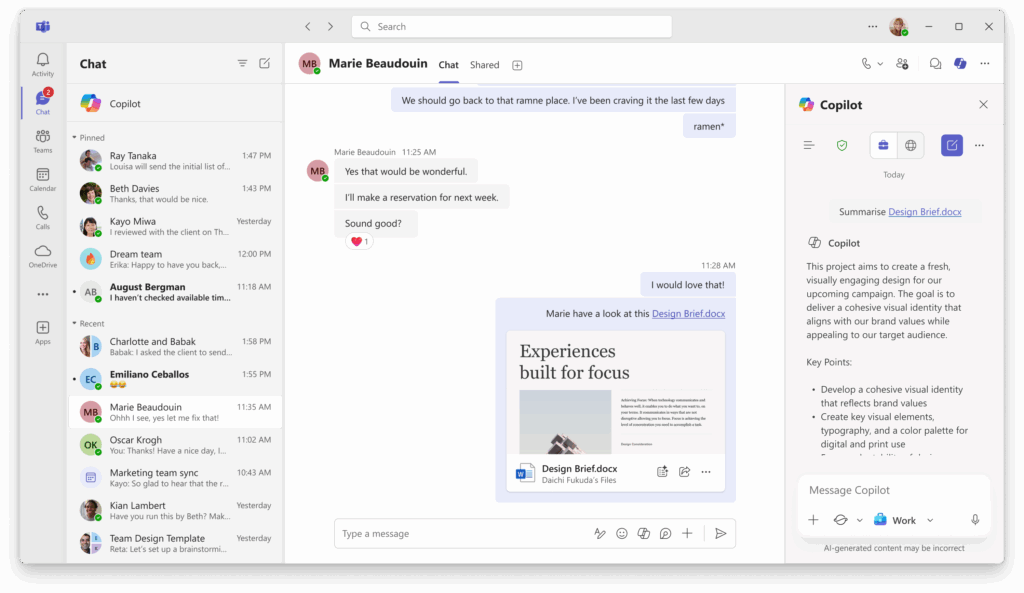
Microsoft has released a new feature that allows users to generate file summaries for Word documents shared in group and 1:1 chats with Copilot in Teams. The latest update makes it easier to understand the main points without reading the entire document. This feature respects the file’s security policies, and it’s also available for mobile users.
Additionally, Microsoft Teams users can now insert emojis by typing a colon before and after the emoji name. The updated shortcut also supports keyword-based search for both standard and custom emojis.
Updates for meetings, webinars, and town halls
Microsoft has announced the general availability of audio recaps in Microsoft Teams. This feature allows users to listen to meeting recaps in different styles (such as Newscast, Executive, Casual). These recaps are accessible on both desktop and mobile, and users can generate up to eight at a time for convenient playback.
The latest update also brings support for multiple camera views and IntelliFrame from Teams Rooms on Windows in Teams webinars and structured meetings. This feature is available for commercial customers with Teams Rooms Pro. Microsoft has introduced support for real-time chat for Teams Premium customers in GCC, GCCH, and DoD environments.
Microsoft Teams Phone updates
Microsoft Teams now comes with a pop-out Intelligent Recap in the Calls app that offers AI-generated summaries and action items from recorded or transcribed calls. This capability helps users quickly review key points and follow-ups by simply selecting “View recap” from their call history.

Microsoft has introduced a new unified calling experience across mobile and Teams endpoints for AT&T customers. Administrators can configure Teams Phone Mobile in the Teams admin center. Moreover, Microsoft Teams Phone devices now offer a smoother call transfer experience with a redesigned interface that supports consulting before transferring. Real-time status updates during direct transfers help users track progress and know when it’s safe to disconnect.
Enhancements for Microsoft Teams Rooms
Microsoft has added a new Facilitator agent in Teams Rooms on Android that offers real-time AI-generated notes and follow-up items during scheduled meetings. Moreover, the new AI-powered Cloud IntelliFrame feature provides improved framing of in-room participants for hybrid meetings on Teams Rooms on Android. Microsoft has also introduced support for dynamic video tile resizing based on occupancy count from Teams Rooms on Android.
The new Live Caption translation feature in Teams Rooms on Android lets users choose a preferred language without affecting other meeting participants. Up until now, users could only see live captions in the spoken language by default. Users can also join Town Halls and Webinars as attendees from Teams Rooms on Android devices.
Microsoft has added a new front-of-room view control that allows presenters to manage display views without affecting attendees on Teams Rooms on Windows. This feature is available for Teams Rooms Pro customers. Moreover, Microsoft Teams Rooms on Windows now offer improved production tools for Town Hall events, which give hosts more control over the attendee experience.

Last but not least, Microsoft has introduced new simplified device settings for voice and face recognition on Teams Rooms on Windows or Android. Moreover, the Pro Management portal reports offer detailed occupancy data captured by Cloud IntelliFrame during meetings to help IT admins gain deeper insights into room usage data. The new recommended actions page in the Teams Rooms Pro Management portal also offers proactive recommendations based on the organization’s environment and upcoming events that can impact devices.

Rabia has a master's degree in Software Engineering and she has years of experience writing professionally about Microsoft products and other technologies. Rabia has also written for OnMSFT.com as well as Windows Report. She is always up to date on t...