Microsoft 365 Accounts Hijacked Through OAuth Device Code Phishing Attacks
Attackers are abusing OAuth device codes and legitimate Microsoft login flows to gain stealthy access to Microsoft 365 accounts.

Key Takeaways:
- Attackers are abusing a legitimate Microsoft 365 device login feature to bypass traditional security controls.
- Phishing campaigns increasingly rely on QR codes, OAuth device codes, and realistic login lures to deceive users.
- Stronger OAuth restrictions and user awareness are critical to reducing the risk of account compromise.
Cybercriminals have found a clever way to hijack Microsoft 365 accounts—by exploiting a legitimate login feature meant for convenience. A new wave of phishing attacks uses device authorization codes to trick users into granting attackers full access, bypassing even multi-factor authentication.
According to a new report from Proofpoint, financially motivated threat actors are abusing the OAuth 2.0 device authorization flow to compromise Microsoft 365 accounts. OAuth 2.0 device authorization flow is a method that allows users to sign in on devices with limited input capabilities (like TVs or IoT devices) by entering a short code on a separate, trusted device. This process securely links the device to the user’s account without requiring full credentials on the constrained device.
How do attackers exploit the device authorization flow?
The attack works by tricking users into authorizing a malicious application through Microsoft’s legitimate device login process. Victims receive phishing emails or QR codes that lead them to enter a device code on the official Microsoft site, believing it’s part of a secure login. However, this action grants attackers OAuth tokens tied to the victim’s account, which enables full access without needing passwords or triggering multi-factor authentication alerts.
SquarePhish/SquarePhish2, which were originally developed by Dell SecureWorks and later released on GitHub, automate phishing attacks by leveraging QR codes and the OAuth device flow to capture user authorization. Another tool, Graphish, which is widely available in underground forums, enables adversary-in-the-middle attacks on Azure app registrations. It convincingly replicates login environments with SSL certificates and real domains, which makes it easy for even low-skilled attackers to execute sophisticated phishing campaigns.
“While this is not necessarily a novel technique, it is notable to see it used increasingly by multiple threat clusters including a tracked cybercriminal threat actor, TA2723,” Proofpoint researchers explained. “Proofpoint threat researchers have identified a malicious application for sale on hacking forums, which could be used for this type of campaign.”
Tools powering device code phishing campaigns
Proofpoint researchers mentioned that recent campaigns highlight how attackers are tailoring lures to maximize success. One campaign titled “Salary Bonus + Employer Benefits Reports 25” used personalized document reminders to trick victims into entering device codes that lead to account compromise.
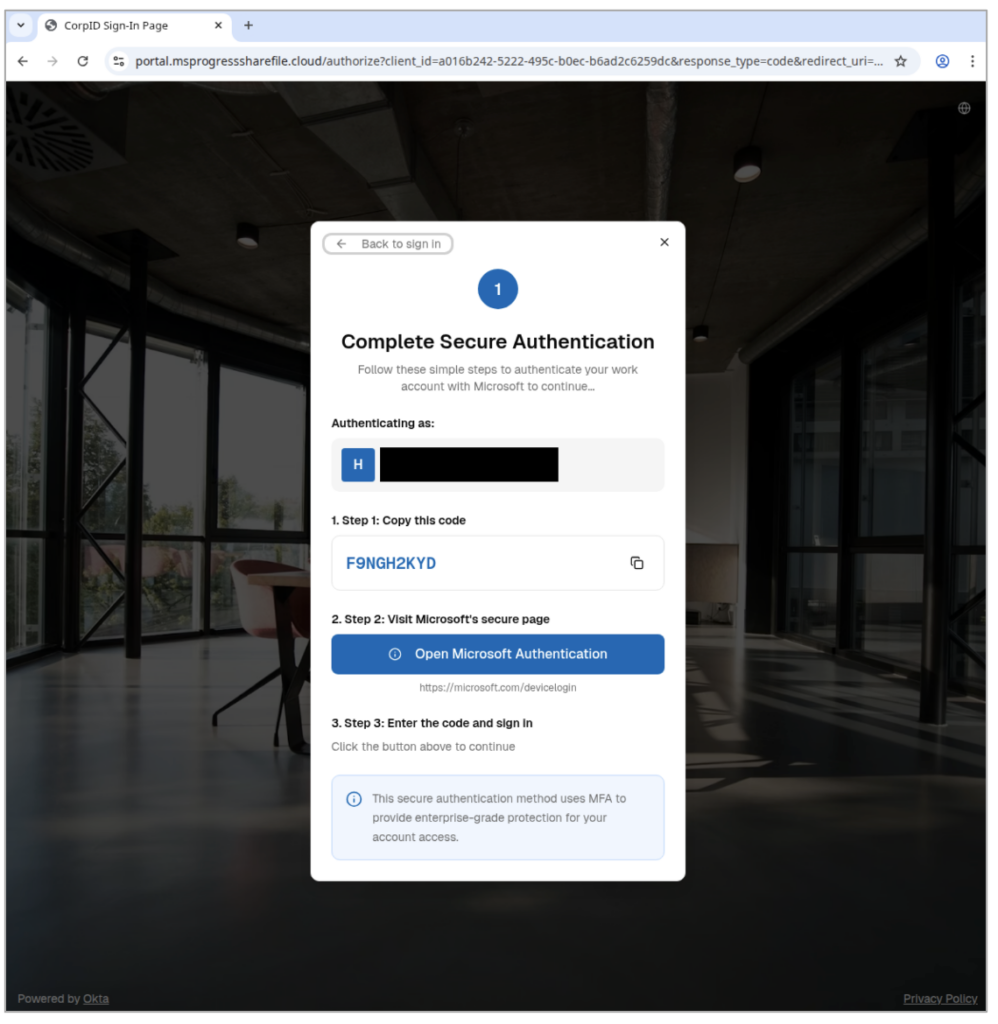
Another financially motivated group (dubbed TA2723) began using OAuth device code phishing in October, which leveraged salary notifications and links like “Access Document” with tools such as SquarePhish2 and Graphish. Meanwhile, a suspected state-aligned actor (called UNK_AcademicFlare) targeted government, academic, and transportation sectors by impersonating legitimate outreach and routing victims through Cloudflare Workers to spoof OneDrive domains.
Recommended security controls to reduce exposure
Organizations are advised to tighten controls around OAuth device code flows to prevent misuse. This includes implementing Conditional Access policies to block or restrict device code authorization, which ideally starts in report-only mode to assess impact before full enforcement. It’s also advised to limit these flows to trusted users, devices, and locations, and require compliant or domain-joined devices through solutions like Microsoft Intune.
Additionally, employees should be trained to recognize phishing attempts and understand that unsolicited device codes (even when entered on legitimate Microsoft sites) can be dangerous. Organizations should combine technical restrictions with awareness programs to significantly reduce the risk of account takeover through this attack vector.

Rabia has a master's degree in Software Engineering and she has years of experience writing professionally about Microsoft products and other technologies. Rabia has also written for OnMSFT.com as well as Windows Report. She is always up to date on t...




