Windows 365 Introduces Trust‑Based Controls for Clipboard, USB, and File Redirection
New feature adjusts clipboard, storage, printer, and USB access based on session trust levels.

Key Takeaways:
- Access decisions can be based on user identity, device posture, and network conditions.
- This feature supports clipboard, USB, printer, and local storage redirection controls.
- It uses Microsoft Entra Conditional Access to enforce context-aware policies.
Microsoft has introduced context-based redirections in public preview for Windows 365. The new capability enables administrators to dynamically control data redirection based on user identity, device posture, and session conditions.
According to Microsoft, traditional data protection methods in cloud environments rely on fixed, one-size-fits-all rules that either allow or block data sharing. This approach makes it harder for organizations to securely support modern work practices because it can either over-restrict users and reduce productivity or fail to prevent data leakage when conditions are less secure.
The context-based redirections feature allows organizations to control how data moves between a Cloud PC and a user’s local device based on context. Instead of permanently allowing or blocking features like copy-paste, USB access, or file transfers, this feature evaluates factors (such as the user’s identity, device security status, and network environment) to decide what should be permitted at that moment.
“Context-based redirections are part of our broader secure bring-your-own-device (BYOD) strategy. Instead of relying only on a one-size-fits-all redirection policy, admins can use Microsoft Entra Conditional Access authentication context with Windows 365 and Azure Virtual Desktop redirection settings to make redirection decisions that better match the trust level of the session,” Microsoft explained.
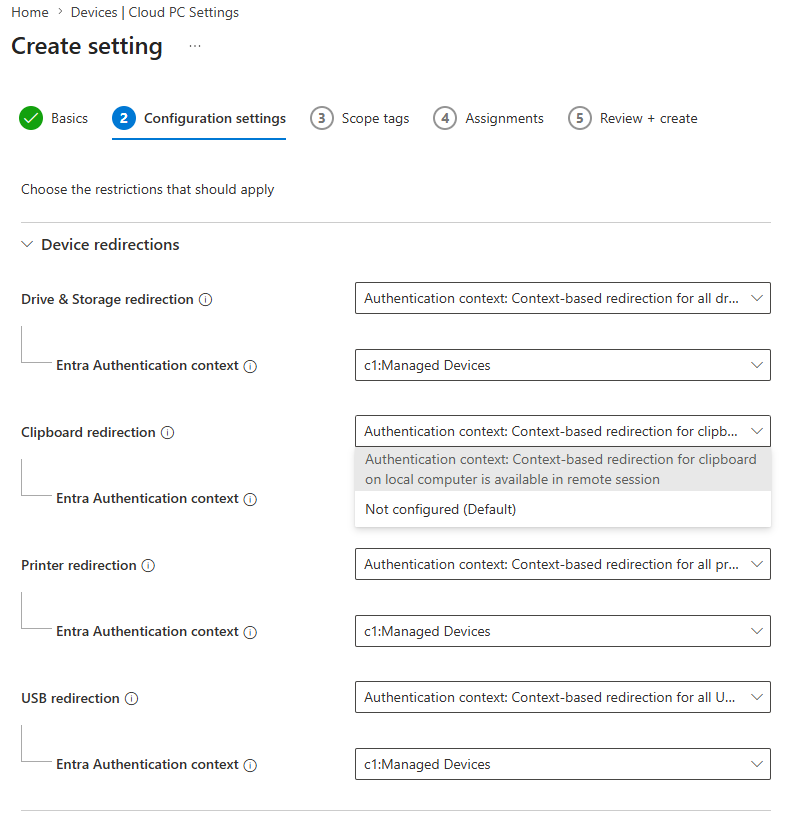
Supported redirection scenarios in Windows 365
Microsoft notes that this feature specifically manages common data-transfer paths, including clipboard (copy/paste), local drives and storage, printers, and USB devices. It will be supported in the Windows App on Windows, macOS, web, Android, and iOS/iPadOS. This feature is currently only supported on Windows 365 Enterprise and Flex (dedicated).
To get started with context-based redirections, IT admins will first create an Entra authentication context and create an Entra Conditional Access to issue the authentication context. They can then configure the Windows 365 Remote Connection Experience setting policy to require the specified authentication context for the targeted redirections.

Rabia has a master's degree in Software Engineering and she has years of experience writing professionally about Microsoft products and other technologies. Rabia has also written for OnMSFT.com as well as Windows Report. She is always up to date on t...