Microsoft Unveils Windows 365 Disaster Recovery Plus: Faster Cloud PC Restoration in Just 30 Minutes
Windows 365 Disaster Recovery Plus is now available in public preview.

Key Takeaways:
- Windows 365 Disaster Recovery Plus reduces the recovery time from four hours to just 30 minutes for enterprises.
- This add-on helps organizations quickly restore access to their Windows 365 Cloud PCs during outages.
- IT admins can activate, configure, and monitor the service through the Microsoft Intune admin center.
Microsoft has launched Windows 365 Disaster Recovery Plus in public preview for enterprise customers. This new offering provides organizations with a faster, more reliable way to restore their Windows 365 Cloud PCs during outages.
Microsoft launched Windows 365 cross-region disaster recovery in July last year. This service allows Windows 365 Enterprise customers to ensure business continuity during regional outages. It works by creating temporary copies of Cloud PCs in different regions, including all user data and settings. This service requires an additional license.
However, the Windows 365 cross-region disaster recovery service has some limitations. The temporary Cloud PC created during disaster recovery is deleted after the service is deactivated, and data, settings, or applications are not preserved. Moreover, this service aims to restore access to Cloud PCs within four hours for tenants who have up to 50,000 Cloud PCs in that region.
With Windows 365 Disaster Recovery Plus, users won’t be able to save their work on the temporary Cloud PC created during disaster recovery. However, this service significantly speeds up restoration, reducing the Recovery Time Objective (RTO) from four hours to just 30 minutes for organizations with up to 50,000 Cloud PCs in a region. This faster recovery minimizes downtime, allowing users to get back to work more quickly during an outage.
Configuring Windows 365 Disaster Recovery Plus
Administrators will be able to configure the Windows 365 Disaster Recovery Plus service through the Microsoft Intune admin center. To do this, navigate to Devices > Windows 365 > User Settings > Optional Business Continuity and Disaster Recovery. Click the Enable additional DR for this User Setting dropdown and choose the “Disaster Recovery Plus” option.
Click Microsoft Hosted Network or Azure Network Connect (ANC) for the network options. Finally, select the geographical location and specific region to create the backup Cloud PCs.
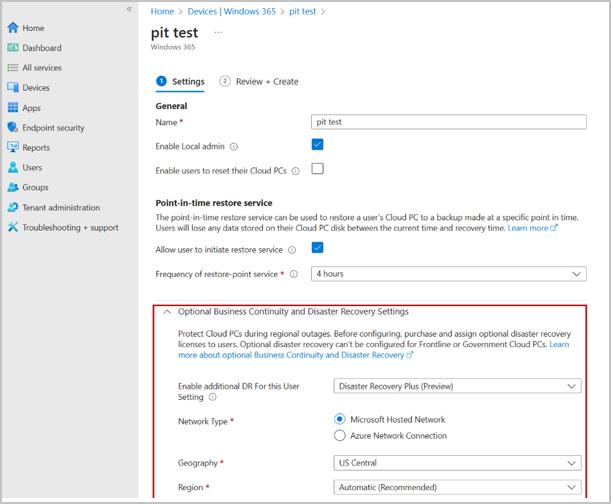
How to activate/deactivate Windows 365 Disaster Recovery Plus
To get started, administrators will need to activate or deactivate the Windows 365 Disaster Recovery Plus add-on through the Microsoft Intune admin center. Navigate to Devices > All devices > Bulk device action > Optional disaster recovery and then select the Activate/Deactivate disaster recovery plus (Preview) option. It’s up to the IT admins to apply this add-on to a set of individual users or user groups.
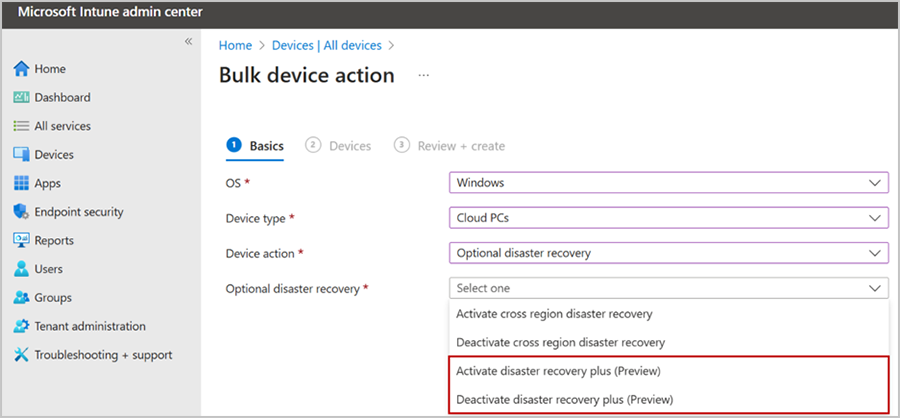
Microsoft notes that enterprise admins can use the Cloud PC optional BCDR status report to monitor and maintain the Windows 365 Disaster Recovery Plus add-on. This report is accessible in the Intune admin center under Reports > Cloud PC overview > Cloud PC optional business continuity and disaster recovery status.
Currently, Windows 365 Disaster Recovery Plus is available in preview as an add-on for Windows 365 Enterprise customers. Microsoft plans to make this new offering generally available for enterprise customers this spring.
Disaster recovery is important for enterprise admins because it helps to ensure business continuity and minimizes downtime during unexpected events such as natural disasters, cyberattacks, and hardware failures. This new licensed add-on is particularly beneficial for organizations that require high disaster recovery performance and need to maintain business continuity with minimal disruption.

Rabia has a master's degree in Software Engineering and she has years of experience writing professionally about Microsoft products and other technologies. Rabia has also written for OnMSFT.com as well as Windows Report. She is always up to date on t...