Microsoft Sets Unified RBAC as Default for New Defender Tenants
Microsoft is simplifying Defender for Office 365 permissions with unified RBAC and more precise email access controls.

Key Takeaways:
- Microsoft is standardizing access control with unified RBAC as the new default.
- Microsoft Defender for Office 365 adds finer email access controls for investigations.
- Organizations are urged to review roles and align permissions before transitioning.
Microsoft is set to make unified role-based access control (RBAC) the default permission model for all new Microsoft Defender for Office 365 environments. The company is also rolling out more granular email access controls to give security teams tighter, more precise control over sensitive data.
Starting on May 30, Unified RBAC will be enabled by default for all new commercial customers with Microsoft Defender for Office 365 Plan 2. Administrators can manage permissions through Defender unified RBAC roles and Microsoft Entra roles.
“Microsoft Defender unified role‑based access control (RBAC) provides a centralized way to manage permissions across the Defender security portfolio, replacing the need to configure and audit access separately for each solution, including endpoint, identity, SaaS, Cloud, and more. Instead of stitching together service‑specific role models, unified RBAC gives security teams one consistent authorization framework to control what users can see and do across the Microsoft Defender portal,” Microsoft explained.
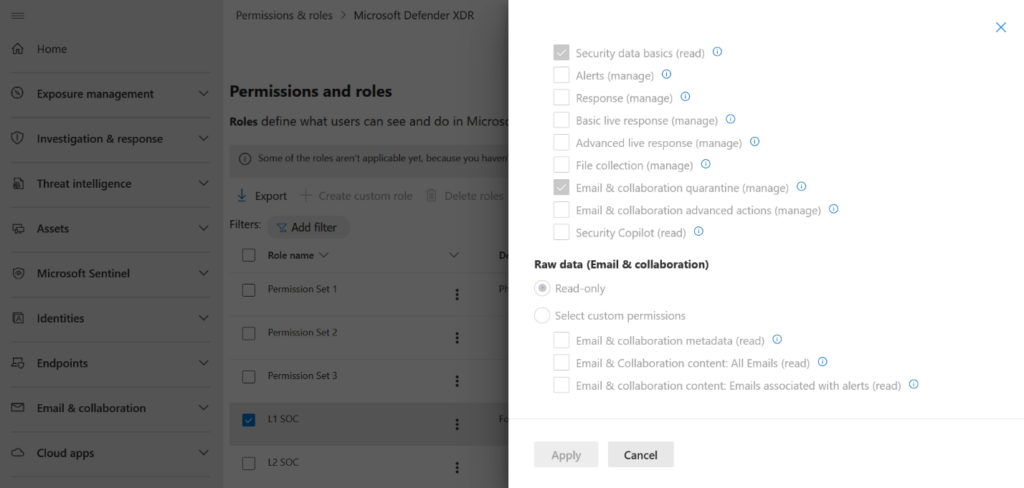
Centralized permissions replace fragmented security roles
The model is built to limit unnecessary access by ensuring users only have the permissions they truly need. This helps organizations reduce excessive privileges, strengthen auditing and visibility, and ensure access is aligned with specific job roles such as analysts or administrators.
According to Microsoft, this new model clearly distinguishes between read-only permissions and action permissions. This separation makes it easier to prevent accidental exposure of sensitive information.
New granular email access controls
Microsoft Defender has added more fine‑grained permissions for handling email data during investigations. These granular controls are designed to support practical security scenarios, such as investigations carried out by Tier‑1 analysts and the review of user‑reported phishing emails. Consequently, security teams can assign precisely the level of access needed for each task, which ensures effectiveness while avoiding unnecessary exposure of sensitive data.
Overall, organizations should take a proactive approach rather than simply adopting the new model. They can start by reviewing existing administrative roles to identify any excessive or outdated permissions, then determine which users actually require access to email content for their specific responsibilities.
It is also important to train security operations (SOC) teams on how to use the new granular permissions effectively, which ensures they understand what level of access is appropriate for different tasks. Finally, organizations still using older RBAC setups should plan a smooth transition to the unified model. It helps to align roles and access policies with the principle of least privilege to improve both security and efficiency.

Rabia has a master's degree in Software Engineering and she has years of experience writing professionally about Microsoft products and other technologies. Rabia has also written for OnMSFT.com as well as Windows Report. She is always up to date on t...




