Microsoft Brings Metrics Usage Insights to Azure Monitor Workspace
Microsoft's new Azure Monitor insights can show which metrics are driving workspace growth and costs, but deciding what to optimize remains an administrative challenge.

Key Takeaways:
- Metrics usage insights is now generally available for Azure Monitor workspace.
- This feature helps administrators analyse metrics consumption, identify growth trends, and find unused metrics.
- Microsoft has also introduced an Ingestion Volume Change dashboard to help teams understand shifts in monitoring data usage.
As Azure environments grow, organizations collect increasing amounts of monitoring data, but many teams struggle to understand which metrics are consuming Azure Monitor workspace capacity, why ingestion volumes are changing, and where optimization opportunities exist. It becomes difficult to control observability costs, manage workspace limits, and investigate unexpected spikes in metrics usage without that visibility.
To address this challenge, Microsoft has announced the general availability of Metrics usage insights for Azure Monitor workspace. This feature provides a centralized view of metrics consumption, which allows administrators to track workspace utilization, analyze metric growth trends, identify high-volume metrics, and find unused metrics that may no longer provide value.
“Metrics usage insights gives you actionable insights into metrics usage and cost optimization opportunities for your Azure Monitor workspace. By providing information on time series and event usage, throttling limits, metrics usage trends, and unused metrics, you can take such actions as removing unused metrics and right-sizing resources,” Microsoft explained.
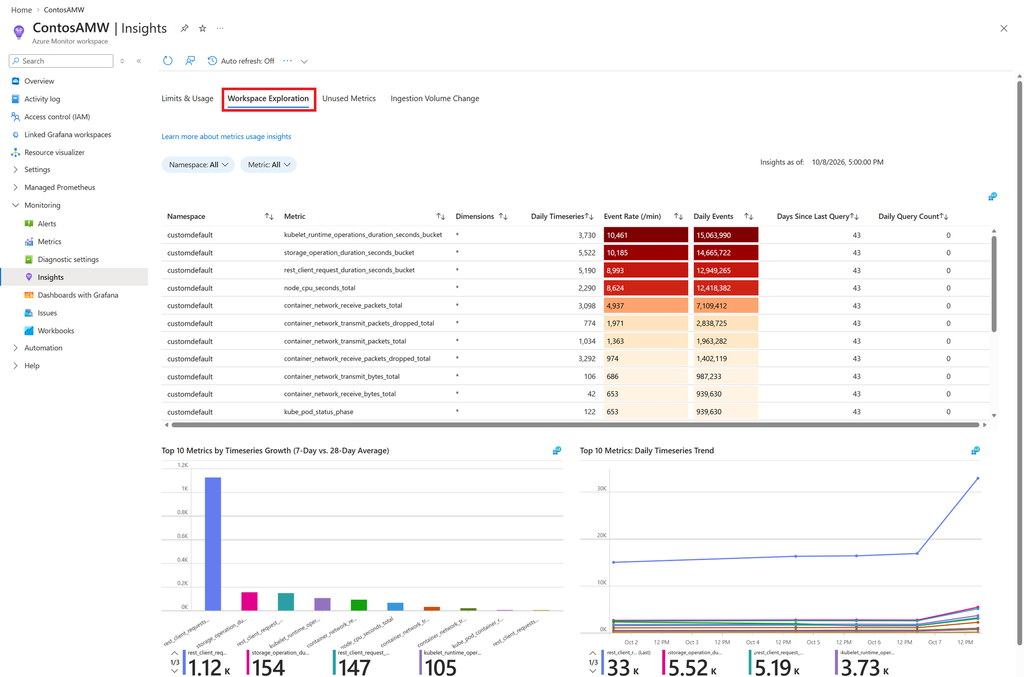
New dashboard helps explain Ingestion Volume Changes
Microsoft has also added an Ingestion Volume Change dashboard, which compares ingestion data across two points in time to help IT teams determine exactly which metrics are driving increases or decreases in usage.
The new insights simplify monitoring investigations and support better cost and capacity management, but organizations must still review the recommendations and decide which metrics can be reduced or removed without affecting observability needs. Keep in mind that greater visibility improves decision-making, but it does not eliminate the need to balance operational insight against data collection costs and monitoring requirements.

Rabia has a master's degree in Software Engineering and she has years of experience writing professionally about Microsoft products and other technologies. Rabia has also written for OnMSFT.com as well as Windows Report. She is always up to date on t...