Microsoft Teams to Let Admins Block External Users Directly from Defender Portal
Admins can block external Teams users via the Defender portal for stronger, centralized security.

Key Takeaways:
- Admins can now block external Teams users and domains via the Defender portal.
- Centralized control speeds up threat response and enhances security.
- Actions are tracked with audit logs, ensuring compliance.
Microsoft is set to roll out a new integration that will let administrators block external users and domains in Teams directly from the Defender portal. This update will strengthen security and give organizations greater control over who can connect across chats, calls, and meetings.
Previously, blocking external users in Microsoft Teams was only possible through the Teams admin center, which offered limited flexibility for security teams. The approach had some drawbacks, such as strict caps on the number of users that could be blocked, no centralized remediation within the Defender portal, and slower response times to threats like phishing attempts, compromised accounts, or risky external conversations.
“We’re introducing an integration between Microsoft Teams and Microsoft Defender for Office 365 that allows security admins to manage blocked external users in Teams through the Tenant Allow/Block List (TABL) in the Microsoft Defender portal. This centralized approach enhances security and compliance by enabling organizations to control external user access across Microsoft 365 services,” the company explained on the Microsoft 365 admin center.
Compliance and audit logging for blocked interactions
With this release, administrators with Teams admin rights will be able to manage external communication directly through the Microsoft Defender portal. They will be able to add, remove, and view blocked users or domains, prevent interactions across chats, channels, calls, and meetings, and even automatically delete any existing conversations from newly blocked users. To ensure compliance, all actions taken on the block list will be tracked through audit logging.
The new block list feature allows administrators to manage up to 4,000 domains and 200 individual email addresses. It works seamlessly across all Teams clients and the Defender XDR portal without disrupting existing federation settings or any blocks already configured in the Teams admin center.
How to block external Microsoft Teams users directly in the Defender Portal?
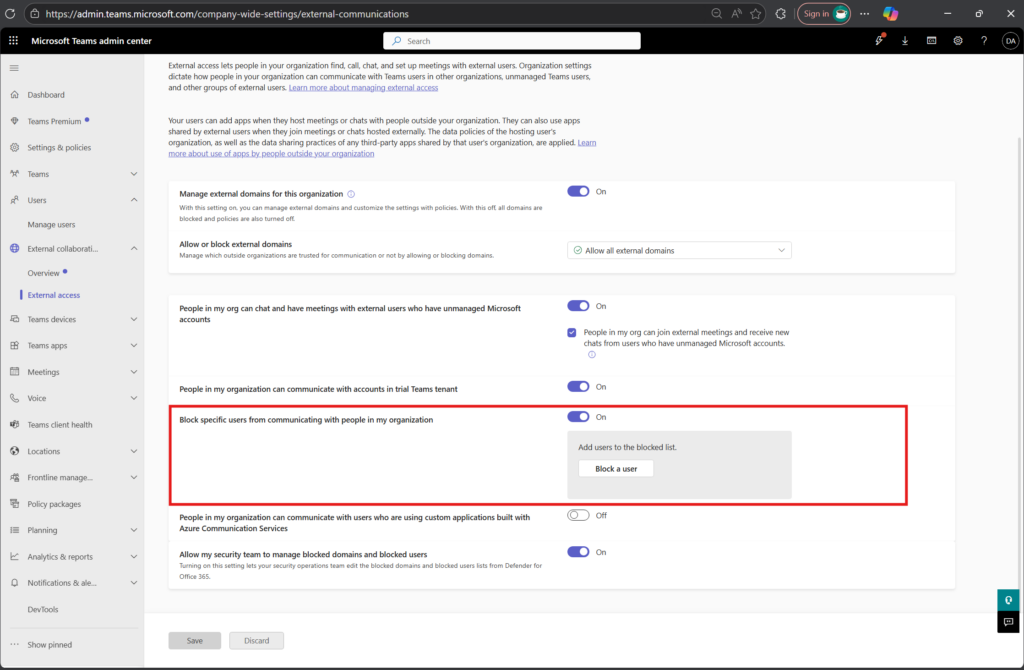
To enable this feature, administrators will need to turn on two settings in the Teams admin center, including “Block specific users from communicating with people in my organization” and “Allow my security team to manage blocked domains and blocked users.” Moreover, they should ensure that security teams have the necessary permissions to manage these lists effectively.
Microsoft plans to begin rolling out this feature in early January 2026 and expects to make it generally available by mid-January 2026. This change will affect customers using Microsoft Teams and Microsoft Defender for Office 365 Plan 1 or Plan 2.
Microsoft’s new blocking capability in Teams is a strategic defense against evolving cyber threats. Attackers increasingly exploit collaboration platforms for phishing and social engineering, which makes communication channels a prime target. This new feature should enable security teams to block malicious actors before they can infiltrate conversations. It will also help to reduce the risk of ransomware attacks and compromised accounts.

Rabia has a master's degree in Software Engineering and she has years of experience writing professionally about Microsoft products and other technologies. Rabia has also written for OnMSFT.com as well as Windows Report. She is always up to date on t...