Microsoft Adds Ephemeral OS Disk Support to Boost Azure Virtual Desktop Performance
A new Azure Virtual Desktop feature designed to speed up deployments and enhance VM performance through local OS storage.

Key Takeaways:
- Microsoft introduces Ephemeral OS Disk support in public preview for Azure Virtual Desktop.
- Designed for stateless VMs, offering faster boot times and improved performance.
- Ideal for pooled host pools where speed and simplicity outweigh data persistence.
Microsoft has launched Ephemeral OS Disk support in public preview for Azure Virtual Desktop. This new feature is part of its Enhanced Host Pool Management initiative aimed at streamlining deployment and boosting performance.
An Ephemeral OS Disk stores the operating system directly on the VM’s local storage rather than in Azure-managed storage. This setup is ideal for stateless workloads, where data doesn’t need to persist after shutdown or reimaging. This disk is tied to the physical host, and it delivers faster boot times, lower latency, and higher performance, which makes it especially useful for virtual desktop environments that require quick provisioning and frequent resets.
Since data is not retained, any changes made during a session are lost once the VM is deleted or reimaged. This makes Ephemeral OS Disks well-suited for scenarios where speed and simplicity are prioritized over long-term data retention, such as pooled host pools in Azure Virtual Desktop.
What are the key features of Ephemeral OS Disks?
Ephemeral OS Disks are optimized for stateless virtual machines that enable fast read/write operations and high IOPS by leveraging local VM storage. They support all image types (Marketplace, custom, and Azure Compute Gallery) and allow rapid reset and reimage to restore VMs to their original state. VMs using these disks cannot be deallocated, and they can only be restarted, reimaged, or deleted.
Limitations
These disks come with specific constraints. They do not support VM deallocation, image capture, disk snapshots, Azure Disk Encryption, Azure Backup, Azure Site Recovery, or OS disk swapping. Consequently, these disks are not suitable for workloads requiring persistent storage, disaster recovery, or advanced disk management features.
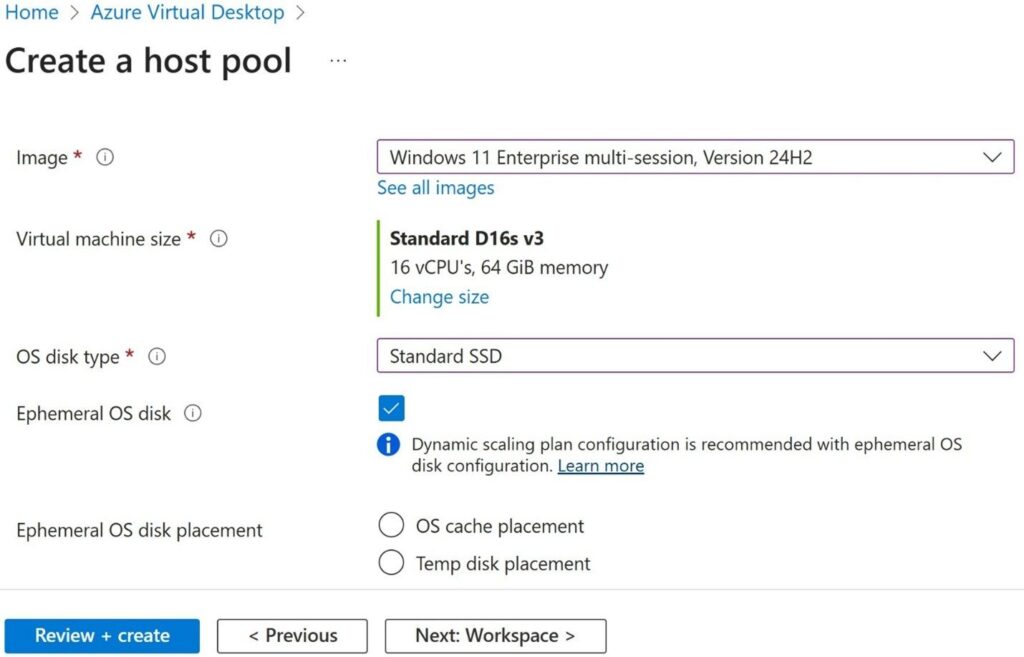
How to get started?
To use ephemeral OS disks, customers will need a pooled host with a session host configuration enabled, which is currently in public preview. This feature isn’t available for personal host pools or those without session host configuration, and setup can be done directly through the Azure Portal.
Microsoft recommends that administrators use Dynamic Autoscaling plans when deploying session hosts with ephemeral OS disks. It allows IT admins to create and delete session hosts according to the rules defined in their scaling plan.

Rabia has a master's degree in Software Engineering and she has years of experience writing professionally about Microsoft products and other technologies. Rabia has also written for OnMSFT.com as well as Windows Report. She is always up to date on t...